
REVENUE SOFTWARE + EXPERT GUIDANCE
Bring revenue management
in-house.
Keep the experts.
Ask about your whole portfolio. See where revenue needs attention, understand the evidence and review what to do next. RevCenter gives your team the tools and expert guidance to run revenue in-house.
Open Ask Rev CenterPriceLabs setup
pricing recommendations
weekly portfolio reviews
revenue-manager chat
YOUR NEW REVENUE HOMEPAGE
Ask Rev Center
Start with what you need to know about your whole portfolio.
Where should I focus today?→Click a question to explore a fictional 30-property portfolio.
No PriceLabs connection or credit card needed.
Our True North
Enable owners of PMCs to manage revenue as well as or better than an outsourced provider,
while saving around 25%versus our previous managed-service fees.
One question.
A clear path forward.
Ask Rev Center is the homepage of your revenue operation. It connects portfolio questions to the charts, reports and pricing tools you need to act with confidence.
- 1
Ask about the portfolio.
What booked? What needs attention? How are we pacing? Start with a common question or type your own.
Find the priorities → - 2
Understand the evidence.
Open the property, stay dates and supporting numbers. Compare price, market occupancy, booking windows and revenue pace.
See the connected charts → - 3
Review the decision.
Compare a price scenario in dollars. Queue the exact dates into the existing two-step approval workflow. You decide whether to raise, lower or hold.
See a pricing review → - 4
Follow the result.
Return to recent bookings and monthly performance. Explain the revenue story to owners and bring questions to your weekly expert review.
Check revenue pacing →
A manager runs pricing for you.
The provider prepares and operates pricing within your service agreement.
Your team runs pricing, with our support.
Software prepares the decisions. You review and approve them, with weekly expert reviews and chat support included.
Your team owns the decisions. Our revenue managers provide weekly reviews and chat support. PriceLabs remains your dynamic pricing engine.
The answer has
evidence behind it.
Move from a portfolio question to the property and stay dates behind it. Charts make the pattern visible; hover details and the underlying table let you check the numbers.
1. Pricing versus market
See the property’s nightly price against market asking-price bands, then read occupancy pacing for the same stay dates. Hover or select a date for exact values.

View the supporting numbers
| Property price | Market 25th | Market median | Market 75th | Market 90th |
|---|---|---|---|---|
| $770.40 | $561.00 | $660.00 | $778.80 | $910.80 |
Asking prices are context, not proof a stay will book. They are not matching-stay checkout totals. The app keeps markup, booked rates and rental revenue clearly separated, with a data table and CSV behind the chart.
2. Occupancy pacing
Are bookings arriving while the market is filling? Compare your booked nights with the market and last year for the same stay dates.
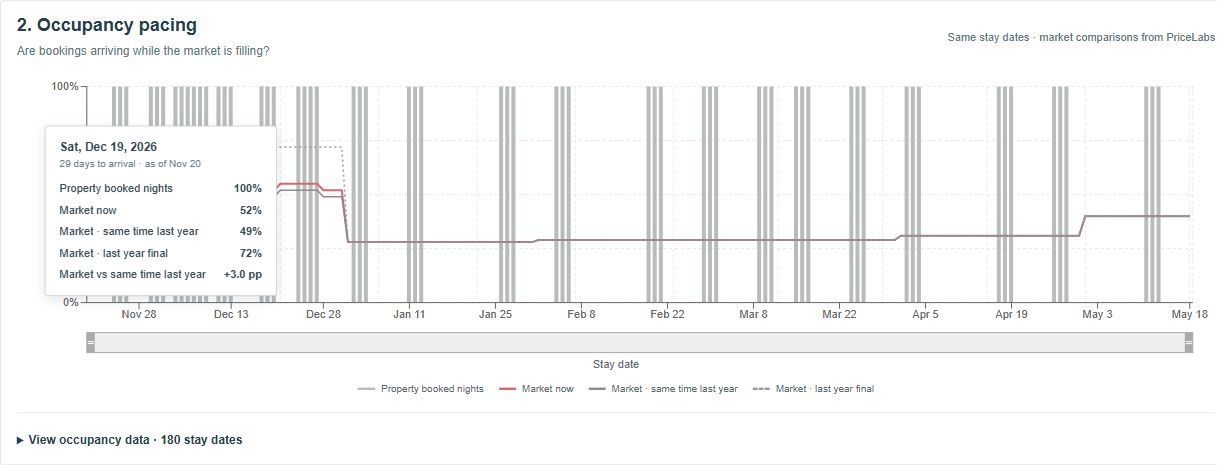
View the supporting numbers
| Property booked nights | Market now | Market same time last year | Market last year final |
|---|---|---|---|
| 100% | 52% | 49% | 72% |
3. Revenue pacing by month
Compare stay months at the same booking stage. Each line shows how rental revenue accumulated, and stops at the latest known data.

View the supporting numbers
| Booking stage | October 2026 | November 2026 | December 2026 |
|---|---|---|---|
| 60 days before month-end | $10,944 | $2,520 | $10,800 |
Different seasons can produce different revenue levels. Use the curve alongside monthly rental revenue, RevPAR, ADR and occupancy. Historical reconstruction cannot establish that a pricing change caused the result.
From evidence
to an exact change.
Ask opens the investigation. Your pricing screen shows the current rate, proposed dollars, percentage rule and stay restrictions before either approval. Holding the current rate is a decision, too.
Walk through a +10% holiday pricing example
Capture holiday demand
More potential rental revenue
on the same three-night booking.
Before fees and taxes; not guaranteed
How the recommendation works
What goes into the recommendation?
The property’s booking pace and cancellations. Last year’s revenue and bookings. Comparable stays, local market demand, booking windows and your revenue goals. RevCenter applies our documented pricing playbook to this context, with AI preparing a recommendation for your review.
Price and minimum stay are assessed together so a higher nightly rate does not obscure an unattractive total stay or an unbookable gap. Review the supporting evidence and any gaps before you decide.
What is the RevCenter factor?
It is the multiplier for your approved rate adjustment. A 10% increase gives a factor of 1.10. At a $500 PriceLabs rate, that works out to an estimated $550.
You can enter a dollar target or a percentage. RevCenter previews the estimated dollar result and sends a percentage rule, so PriceLabs can keep responding to the market. PriceLabs recalculation, limits and rounding can affect the final rate. Minimum stay is a separate setting reviewed alongside price.
How do I know where to focus?
Review cancellations first. Then look at the open nights inside the market booking window, occupancy versus the market and the value of the stay week. Open the property’s price and demand charts to inspect the evidence. After an approved change, follow bookings and rental revenue to decide whether to hold or adjust.
See the actual approval screen
Review the estimated price, percentage rule and minimum stay before both approvals. Nothing is sent to PriceLabs until the required human approvals are complete.

Your questions.
Your evidence.
Your decision.
Open Ask Rev Center and explore a fictional portfolio. Follow a question into a report, inspect a property’s charts, then practice a pricing review. The same dates and context travel with you.
“Which cancellations need attention?”
Find reopened nights → inspect the calendar and demand → review a price.
KNOW WHEN TO ACT“Are we getting the bookings we need?”
Compare booking timing and occupancy → open the evidence → raise, lower or hold.
FOLLOW THE REVENUE“How is monthly revenue pacing?”
Compare months and last year → inspect the supporting table → explain the result.
Fictional demo data, not customer results. Practice changes stay in your demo session.
Open Ask Rev Center →Could this work for your portfolio?
In a 20-minute intro with Adrian, discuss your properties, your PriceLabs setup and who would own the weekly review. Cover onboarding, expert support and a portfolio quote.
PriceLabs remains a separate subscription. No PriceLabs access needed for the call.One revenue story.
From forecast to owner report.
Dial in PriceLabs.
Property by property.
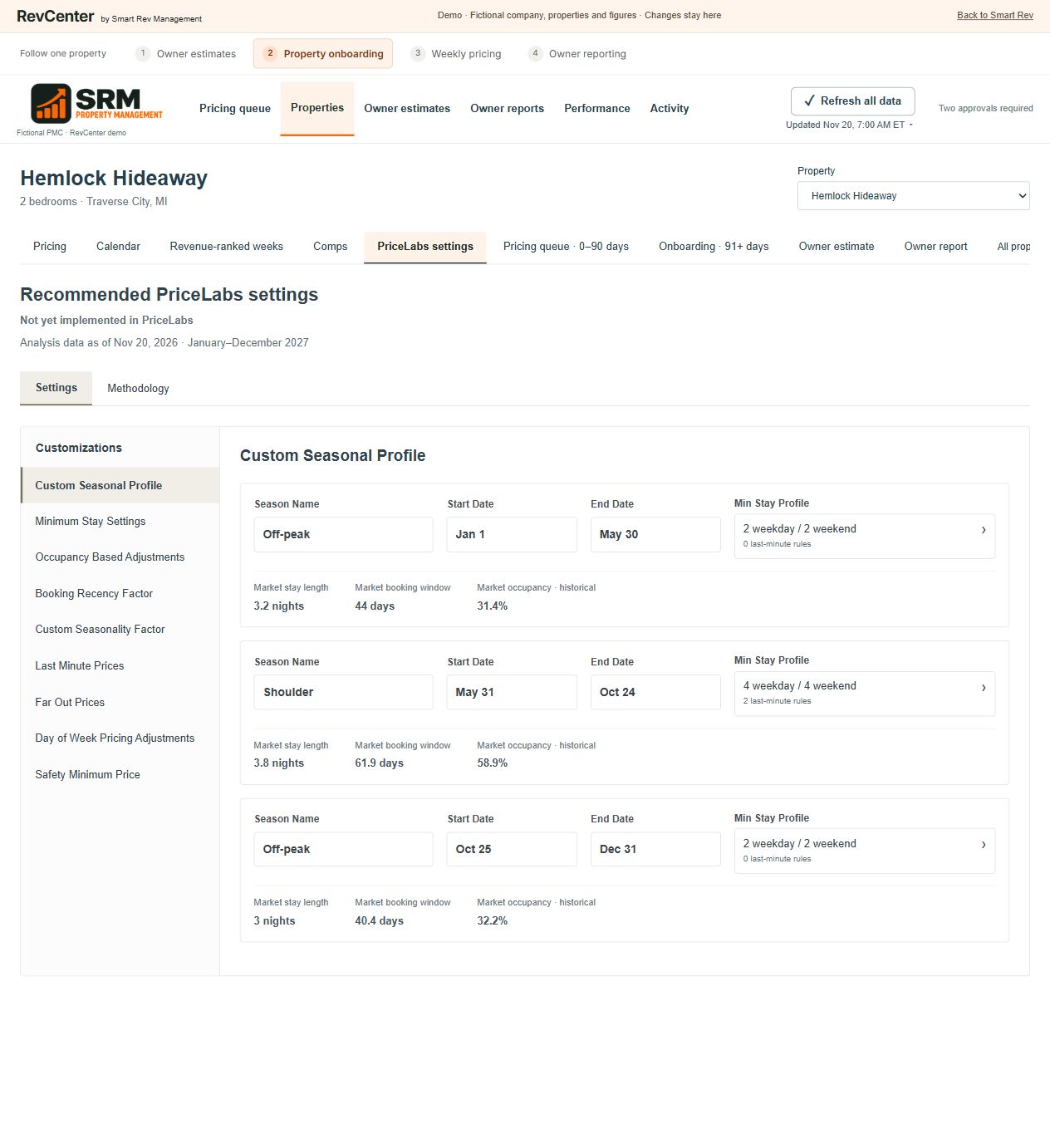
AI applies that same playbook to prepare granular PriceLabs settings around each property’s market, seasons and goals. Seasonal profiles are standard.
Explore the settings
Seasonal pricing. Weekday and weekend patterns. Booking windows and far-out pricing. Last-minute reductions. Orphan gaps. Minimum stays and price floors.
RevCenter brings the preparation into one place so you can review the proposed setup. Required human approval comes before changes are sent.
Built by the team
that used to do
this for you.
After working with property managers at Airbnb, our founder built Smart Rev Management into a nationwide revenue management business.
Our most successful customers stayed involved in revenue. We built RevCenter around that: our playbook in software, more control for you, and our revenue managers still alongside you.
A recorded portfolio review.
An expert revenue manager reviews your portfolio each week and walks you through their findings. Flag a property or question beforehand and we’ll cover it in the next review.
A team you can ask.
Ask our revenue managers questions through chat. You have people to turn to as you learn the platform and work through pricing decisions.
A few practical questions.
Will I have to become a revenue management expert?
RevCenter prepares the analysis and recommendations so you can review the important decisions. Our team helps with property setup. An expert revenue manager provides a weekly recorded portfolio review, with chat access for your questions. You or a colleague still need to make time to review and approve pricing.
Do I keep my PriceLabs subscription?
Yes. RevCenter works with the PriceLabs you already use. Your PriceLabs subscription is separate.
What can I ask Rev Center?
Start on the portfolio homepage with ten common questions about recent bookings, cancellations, open nights, booking windows, market occupancy and revenue pace. Choose a property from an answer to inspect the same dates in charts and reports.
Try “Last year +15%” or “Lower current prices by 10%.” See the dollar estimate, then queue the exact changes into the same two-step pricing approval flow. Ask uses saved data and calculations; it keeps evidence gaps visible and does not send prices. Your included revenue-manager chat remains available for more involved strategy questions.
Can RevCenter change pricing without my approval?
No. Changes sent by RevCenter require human approval, including the two approval steps for pricing. PriceLabs can continue recalculating rates within settings you have already approved.
What does RevCenter cost?
We quote for your portfolio. Our target is around 25% below what we charged for our managed service. Your quote includes a weekly recorded portfolio review by an expert revenue manager and daily chat access. PriceLabs is a separate subscription. Book a 20-minute intro to discuss your quote.
Explore the product details
How do comps connect projections and pricing?
The upcoming owner-forecast workflow is designed to carry selected comparable properties into weekly pricing. When matching-stay prices are available, review them alongside your own bookings, pace and revenue goal.
Can I manage pricing toward the goals I gave an owner?
The upcoming owner tools are designed to connect your projection and revenue goal to weekly pricing reviews. Today, use the live booking, market and monthly performance reports to review progress; preview the owner workflow in the demo.
Can I see what happens after a price change?
Yes. Follow recently changed prices alongside new bookings and cancellations, and compare booking pace with the same point last year. Use that activity in your next review to decide whether to hold your position or adjust.
How far ahead does RevCenter help me plan?
The weekly AI pricing review covers the next 90 days. Property-specific seasonal profiles prepare pricing and minimum-stay settings beyond that window, so near-term decisions sit within a longer-term plan.